
Bench Commands
Bench fixtures Command
Generate a .json file containing the data and settings you want to migrate
Pre-requisite defined the fixtures in hook file of the custom app
Command Syntax
bench export-fixtures --site <sitename>Use Cases
bench export-fixtures --site dev.localhostSample Output
A custom_field.json file will be created in the path <custom_app>/<custom_app>/fixtures
Bench backup Command
- Use this command to take backup of the site.
- Run this command inside the backend container of your application.
Command Syntax
bench --site <site-name> backupOptions
| Options | Description |
|---|---|
--with-files | Backup along with public and private files |
Use Case
1) Without Flag
bench --site lenstest.lmnas.com backupSample Output
Backup encryption is turned on. Please note the backup encryption key.Backup Summary for lenstest.lmnas.com at 2025-05-29 11:18:07.105285Config : ./lenstest.lmnas.com/private/backups/20250529_111752-lenstest_lmnas_com-site_config_backup-enc.json 282.0BDatabase: ./lenstest.lmnas.com/private/backups/20250529_111752-lenstest_lmnas_com-database-enc.sql.gz 40.0MiBBackup for Site lenstest.lmnas.com has been successfully completed2) With Flag
bench --site lenstest.lmnas.com backup --with-filesSample Output
Backup encryption is turned on. Please note the backup encryption key.Backup Summary for lenstest.lmnas.com at 2025-05-29 11:21:50.643478Config : ./lenstest.lmnas.com/private/backups/20250529_112132-lenstest_lmnas_com-site_config_backup-enc.json 282.0BDatabase: ./lenstest.lmnas.com/private/backups/20250529_112132-lenstest_lmnas_com-database-enc.sql.gz 40.0MiBPublic : ./lenstest.lmnas.com/private/backups/20250529_112132-lenstest_lmnas_com-files-enc.tar 123.1MiBPrivate : ./lenstest.lmnas.com/private/backups/20250529_112132-lenstest_lmnas_com-private-files-enc.tar 6.3MiBBackup for Site lenstest.lmnas.com has been successfully completed with filesBench restore Command
- Use this command to restore the site with the backup files.
- Run this command inside the backend container of your application.
Command Syntax
bench --site <site-name> restore <path/to/backup-files>Options & Flags
| Type | Description | |
|---|---|---|
--force | flag | Ignore warnings |
--with-public-files | option | Restores the public files of the site |
--with-private-files | option | Restores the private files of the site |
--encryption-key | option | Pass Backup encryption key if the backup file is encrypted (Only use this when you find enc in the backup file names) |
Use Case
1) Without force Flag
bench --site lenstest.lmnas.com restore ./sites/lenstest.lmnas.com/private/backups/20250529_020517-lenstest_lmnas_com-database.sql.gzSample Output
$ bench --site lenstest.lmnas.com restore ./sites/lenstest.lmnas.com/private/backups/20250529_020517-lenstest_lmnas_com-database.sql.gzMySQL root password:Restoring Database for Site lenstest.lmnas.com...Database backup found at ./sites/lenstest.lmnas.com/private/backups/20250529_020517-lenstest_lmnas_com-database.sql.gzExtracting...Database successfully extractedInstalling database...Rebuilding database lenstest_lmnas_com...Database restoredUpdating DocTypes for lenstest.lmnas.com : [========================================]Updating patched modules...Backing up the newly restored database...Backup completeSite restored successfully.2) With force Flag
bench --site lenstest.lmnas.com --force restore \ ./sites/lenstest.lmnas.com/private/backups/20250529_020517-lenstest_lmnas_com-database.sql.gz \ --with-public-files ./sites/lenstest.lmnas.com/private/backups/20250529_020517-lenstest_lmnas_com-files.tar \ --with-private-files ./sites/lenstest.lmnas.com/private/backups/20250529_020517-lenstest_lmnas_com-private-files.tazSample Output
MySQL root password:
App frappe already installed*** Scheduler is enabled ***Site localhost has been restored with files
3) With encrypted backup
bench --site lenstest.lmnas.com --force restore \ ./sites/lenstest.lmnas.com/private/backups/20250529_020517-lenstest_lmnas_com-database-enc.sql.gz \ --with-public-files ./sites/lenstest.lmnas.com/private/backups/20250529_020517-lenstest_lmnas_com-files-enc.tar \ --with-private-files ./sites/lenstest.lmnas.com/private/backups/20250529_020517-lenstest_lmnas_com-private-files-enc.tar \ --encrypted-key hgsdajhvfjwtef7363jkhajkfgjSample Output
Provide encryption key for decryption. Decrypting using the provided keyMySQL root password:
App frappe already installed*** Scheduler is enabled ***Site localhost has been restored with files
Bench migrate Command
- applies all pending patches and updates the database schema to match the current code.
- Run this command inside the backend container of your application.
Command Syntax
bench --site <site-name> migrateUse Case
bench --site lenstest.lmnas.com migrateSample Output
Migrating lenstest.lmnas.comUpdating DocTypes for frappe : [========================================] 100%Updating DocTypes for payments : [========================================] 100%Updating DocTypes for erpnext : [========================================] 100%Updating Dashboard for frappeUpdating Dashboard for paymentsUpdating Dashboard for erpnextUpdating customizations for AddressUpdating customizations for ContactQueued rebuilding of search index for lenstest.lmnas.comEnabling scheduler in bench
- Commands to manage the scheduler and background jobs statuses for the sites on your bench.
- Run this command inside the backend container of your application.
Command Syntax
bench --site <site-name> enable-schedulerUse Case
bench --site lenstest.lmnas.com enable-schedulerSample Output
Enabling scheduler for lenstest.lmnas.comScheduler enabledDisable scheduler in bench
- Commands to stop the scheduler and background jobs statuses for the sites on your bench.
- Run this command inside the backend container of your application.
Command Syntax
bench --site <site-name> disable-schedulerUse Case
bench --site lenstest.lmnas.com disable-schedulerSample Output
Disabling scheduler for lenstest.lmnas.comScheduler disabledEnabling server script in Version-15 bench
Note: Starting from version 15, Server Scripts are disabled by default.
Command Syntax
bench set-config -g server_script_enabled 1Bench Maintenance Mode Command
Enable or disable maintenance mode for a site to restrict user access during updates or maintenance activities.
Command Syntax
bench --site <sitename> set-maintenance-mode <on|off>Use Cases
# Enable maintenance modebench --site dev.localhost set-maintenance-mode on
# Disable maintenance modebench --site dev.localhost set-maintenance-mode off
Sample Output
-
When enabled:
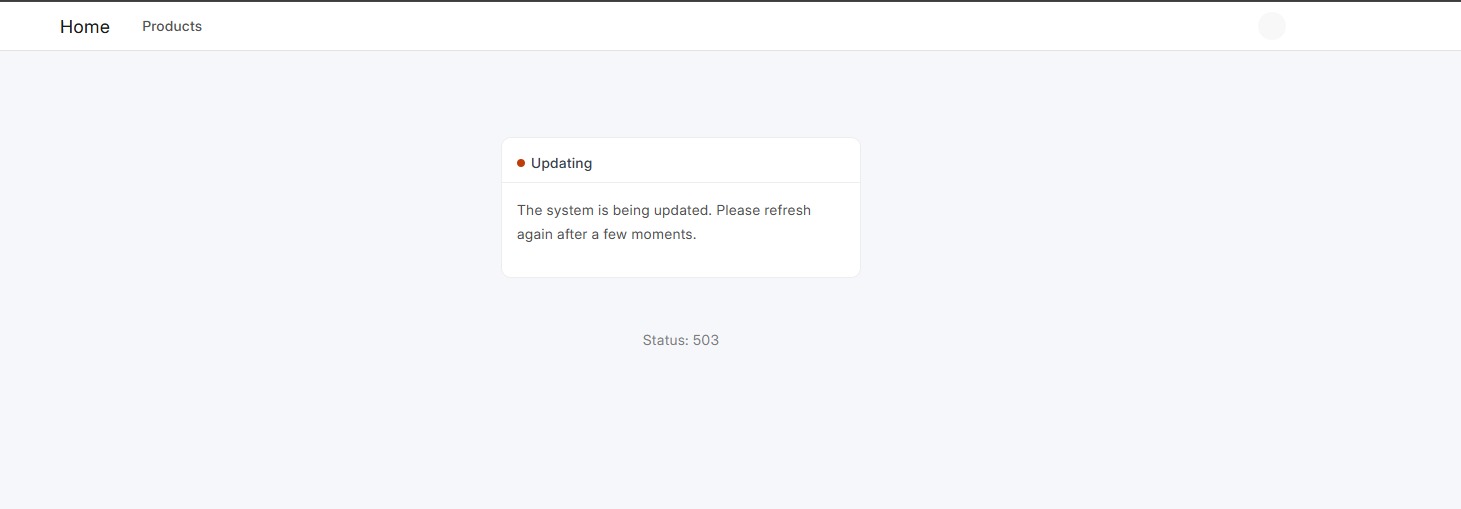
-
When disabled:
Normal site access is restored for all users.
Bench start Command
- Starts the Bench development environment and all configured processes.
- Run this command from the Bench directory.
Command Syntax
bench startUse Case
bench startAccessing a Local Site
Sites can be accessed in the browser using:
<sitename>:8000Example
dev.localhost:8000Bench get-app Command
- Downloads an app from a Git repository or Frappe Marketplace and adds it to the Bench.
Command Syntax
bench get-app <app-name> / [repo-link]Options
| Options | Description |
|---|---|
--branch <branch-name> | Fetches the app from a specific branch |
Use Case
bench get-app https://github.com/lmnaslimit/custom_appWith Branch
bench get-app --branch develop https://github.com/lmnaslimit/custom_appGetting an App from Frappe Marketplace
bench get-app erpnextBench new-site Command
- Creates a new Frappe site.
Command Syntax
bench new-site <site-name>Use Case
bench new-site dev.localhostFor Local Development
-
Site name should follow the format .localhost
-
Administrator password:
-
MySQL root password: <MySQL_pwd>
Bench drop-site Command
- Removes the site and its database completely.
Command Syntax
bench drop-site <site-name>Options
| Options | Description |
|---|---|
--root-login | Root database login |
--root-password | Root database password |
Use Case
bench drop-site dev.localhostNote: Take a backup of the site before dropping it if the data is required later.
Bench new-app Command
- Creates a new Frappe application in the Bench.
Command Syntax
bench new-app <app-name>Use Case
bench new-app custom_appSample Output
App Title [Custom App]: custom_appApp Description: A custom app for overridingApp Publisher: LMNAsApp Email: email@email.comApp License:Bench uninstall-app Command
- Uninstalls an app from the specified site and removes everything linked to the app.
Note: Bench should be running when executing this command.
Command Syntax
bench --site <site-name> uninstall-app <app-name>Use Case
bench --site dev.localhost uninstall-app custom_appBench remove-app Command
- Removes an app from the Bench entirely.
Command Syntax
bench remove-app <app-name>Use Case
bench remove-app custom_appNote: If the app is installed on a site, uninstall the app from the site before removing it from the Bench.
Bench data-import Command
-
Imports bulk data into a DocType.
-
Supports
.csv,.xls, and.xlsxfiles.
Command Syntax
bench data-importOptions
| Options | Description |
|---|---|
--file | File name |
--doctype | DocType to import data into |
--type | Import type: Insert or Update |
Import type: Insert or Update
Use Case
bench data-import --file items.xlsx --doctype Item --type InsertBench run-tests Command
- Runs tests for the specified site.
Command Syntax
bench --site <site-name> run-testsOptions
| Options | Description |
|---|---|
--app | Run tests for a specific app |
--doctype | Run tests for a specific DocType |
--test | Run a specific test |
--module | Run tests for a specific module |
--profile | Run tests with Python profiling enabled |
Use Cases
1) Run tests for a site
bench --site dev.localhost run-tests2) Run tests for a specific app
bench --site dev.localhost run-tests --app custom_app3) Run tests for a specific DocType
bench --site dev.localhost run-tests --doctype Item4) Run a specific test
bench --site dev.localhost run-tests --test test_example